Tag: German

  • German learning in different ways – active and passive German learning, mobile app & ChatGPT.👇👇

    German learning in different ways – active and passive German learning, mobile app & ChatGPT.👇👇

    Examples of flashcard topics for learning German and sample prompts for ChatGPT.

    🧠🎧 Vocabulary and Translations

    Prompt:
    Generate 30 flashcards in the format: German ” – ” English
    Topic: basic words and their translations
    Level: A1
    Do not use any other additional characters


    🧠🎧 Everyday Phrases and Short Dialogues

    Prompt:
    Generate 25 flashcards in the format: German ” – ” English
    Topic: everyday phrases and short dialogues
    Level: A2
    Do not use any other additional characters


    🧠 Grammar (tenses, structures, moods, full sentences)

    Prompt:
    Generate 20 flashcards in the format: German ” – ” English
    Topic: sample sentences in the Perfekt tense
    Level: B1
    Do not use any other additional characters


    🧠 Grammar – Gap-Fill Sentences (missing word on the back)

    Prompt:
    Generate 20 flashcards in the format:
    German (sentence with a blank “___”) ” – ” missing word in German
    Topic: the verb sein in the Präteritum tense
    Level: A2
    Do not use any other additional characters

    Example format:
    Gestern ___ ich krank. – war
    Wir ___ im Sommer in Berlin. – waren


    🧠 Irregular Verbs

    Prompt:
    Generate 30 flashcards in the format: German ” – ” English
    Topic: conjugation and use of irregular verbs (sein, haben, gehen, sehen) in sample sentences
    Level: A2
    Do not use any other additional characters


    🧠 Prepositions and Ready-Made Phrases

    Prompt:
    Generate 25 flashcards in the format: German ” – ” English
    Topic: prepositions and fixed expressions (e.g., zu Hause, in der Stadt, mit Freunden)
    Level: A2
    Do not use any other additional characters


    🧠 Idioms and Collocations

    Prompt:
    Generate 20 flashcards in the format: German ” – ” English
    Topic: idioms and collocations used in everyday speech
    Level: B2
    Do not use any other additional characters


    🧠🎧 Questions and Answers

    Prompt:
    Generate 20 flashcards in the format: German ” – ” English
    Topic: questions and answers in German (everyday situations)
    Level: A1
    Do not use any other additional characters


    🎧 Specialized Vocabulary and Phrases

    Prompt:
    Generate 25 flashcards in the format: German ” – ” English
    Topic: medical vocabulary and phrases
    Level: B1
    Do not use any other additional characters


    🎧 Example Sentences

    Prompt:
    Generate 20 flashcards in the format: German ” – ” English
    Topic: examples of how the verb arbeiten is used in different contexts
    Level: B1
    Do not use any other additional characters


    🧠 Synonyms and Antonyms

    Prompt:
    Generate 20 flashcards in the format: German ” – ” English
    Topic: synonyms and antonyms (e.g., schnell ↔ langsam, glücklich ↔ traurig)
    Level: B1
    Do not use any other additional characters


    🧠🎧 Thematic Sets by Level

    Prompt:
    Generate 25 flashcards in the format: German ” – ” English
    Topic: “Shopping” – vocabulary and phrases
    Level: A1
    Do not use any other additional characters


    How to Create Your Own Flashcards Using Artificial Intelligence – Using ChatGPT as an Example, from YouTube Videos, Documents, Photos, and Notes. 👇👇👇👇👇👇

    https://blog.notifyword.com/blog/2025/12/30/chatgpt-flashcards-from-videos-images-notes-for-active-and-passive-learning-in-mobile app/

    After importing flashcards into the mobile app NotifyWord, you can learn German in different ways:

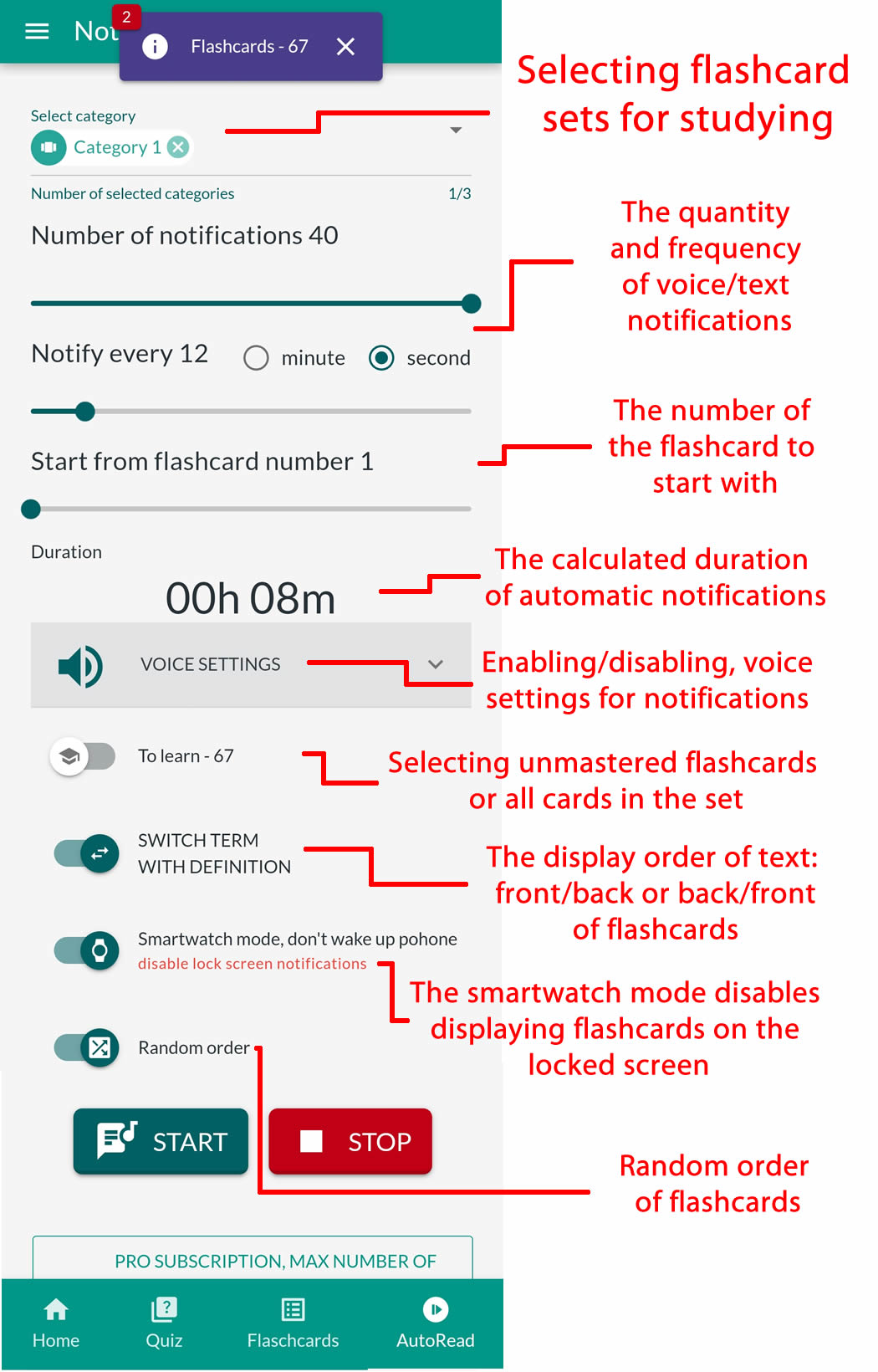
    👉 AUTOLEARN – passive mode – works without touching your phone, firing flashcards straight to your ears 🎧, eyes 👁️, brain 🧠, and memory 💾.
    👉 Quizzes – active mode – require interaction.
    👉 Interactive Flashcards – multiple browsing options, mark favorites or learned items, use Google Translator, text-to-speech (TTS), and choose languages and voices for the front and back of your cards.

    🔎 Legend:

    🧠 Active Learning – flashcards ideal for quizzes, tests, and recall practice. They help strengthen memory, associations, and answer formulation.

    🎧 Passive Learning – flashcards for listening and quick viewing. The app reads them aloud and displays them automatically. Perfect for immersing yourself in a language and reinforcing knowledge without active effort.

    📲 You’ll find the link to the mobile app NotifyWord at 👉 NotifyWord.com

    💡 Flashcards are small cards (physical or digital) used for learning and memorization. One side usually contains a question, word, or concept, and the other side holds the answer, definition, or translation. They’re widely used for learning foreign languages, terminology, historical dates, and other knowledge that requires memorization. Flashcards are popular because they enable effective, repeatable learning and easy self-testing.

    Learn German mobile app Flashcards App
  • Learning languages while driving, cycling, walking, and shopping – flashcards for mobile app.

    Learning languages while driving, cycling, walking, and shopping – flashcards for mobile app.

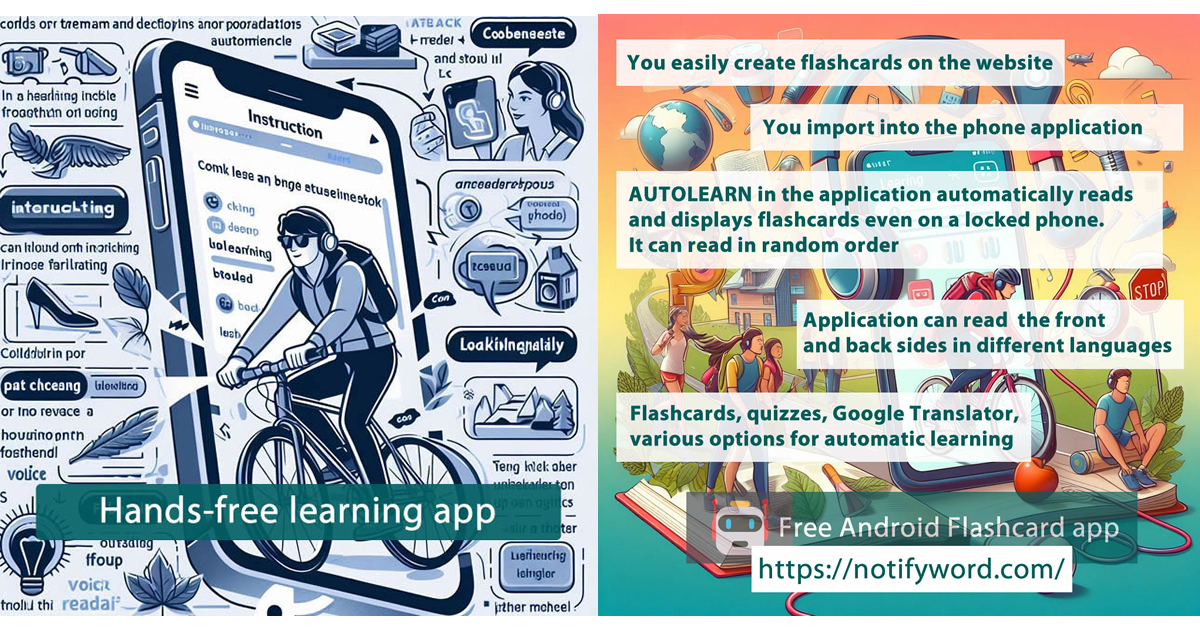
    NotifyWord Free Flashcards for mobile app – effortless learning WITHOUT CLICKING❗

    With NotifyWord, you can effortlessly learn vocabulary, common phrases, pronunciation, and various definitions.

    Autolearnautomatic voice playback of flashcards with notifications for hands-free learning. The app can read flashcards in different ways, supporting two languages. For example, you can set the front of the card to English (or any other language) and the back to Spanish or any other language of your choice.

    For popular languages like English, Spanish, Italian, German, and French, you can choose from multiple text-to-speech voices, both male and female. Adjust the narrator’s voice, playback speed, and frequency of flashcard reading to match your preferences and make learning even more enjoyable.

    🎵 Musical Relaxing Repeats 🎵

    One of the unique features of the app is the ability to play flashcards in the background while you listen to your favorite music. This turns language learning into a pleasure – no clicking required!

    The app also allows you to select multiple sets of flashcards at once. You can focus on learning one set while using another for review. What’s more, flashcards can be mixed from different sets for varied learning. Mark cards as learned and focus only on those that still need your attention.

    Take full advantage of NotifyWord’s features – quizzes, integration with Google Translate, various options for importing and displaying flashcards – to combine learning with your daily tasks and entertainment. Maximize productivity and achieve your language goals in the most convenient way! 😎🎵🕺💃

  • German Language Hands-Free Learning, voice flashcards, a new app for learning and creating your own flashcards on mobile app – NotifyWord.

    German Language Hands-Free Learning, voice flashcards, a new app for learning and creating your own flashcards on mobile app – NotifyWord.

    Effective and highly convenient learning of German : vocabulary, phrases, and pronunciation.

    AutoLearn in the app offers various options for automatically playing and displaying flashcards, making your German and other language learning more effective and comfortable, tailored to your lifestyle.

    Key Features:

    • Automatic flashcard playback and display in notifications – Learn hands-free, even with your phone’s screen locked. You can study and review even while performing daily tasks.
    • Voice Selection for Text-to-Speech – Customize the app to your preferences by choosing a female or male voice. The app can read both the front and back of flashcards in two languages, German , Engilsh, and many others, without needing to touch your phone, with various options for automatic learning.
    • Random Quizzes – These are excellent tools for reviewing material and checking your progress.
    • Various flashcard display methods – Front-back, back-front, random, front-only, or back-only, different ways to display information increase the chances of memorization.
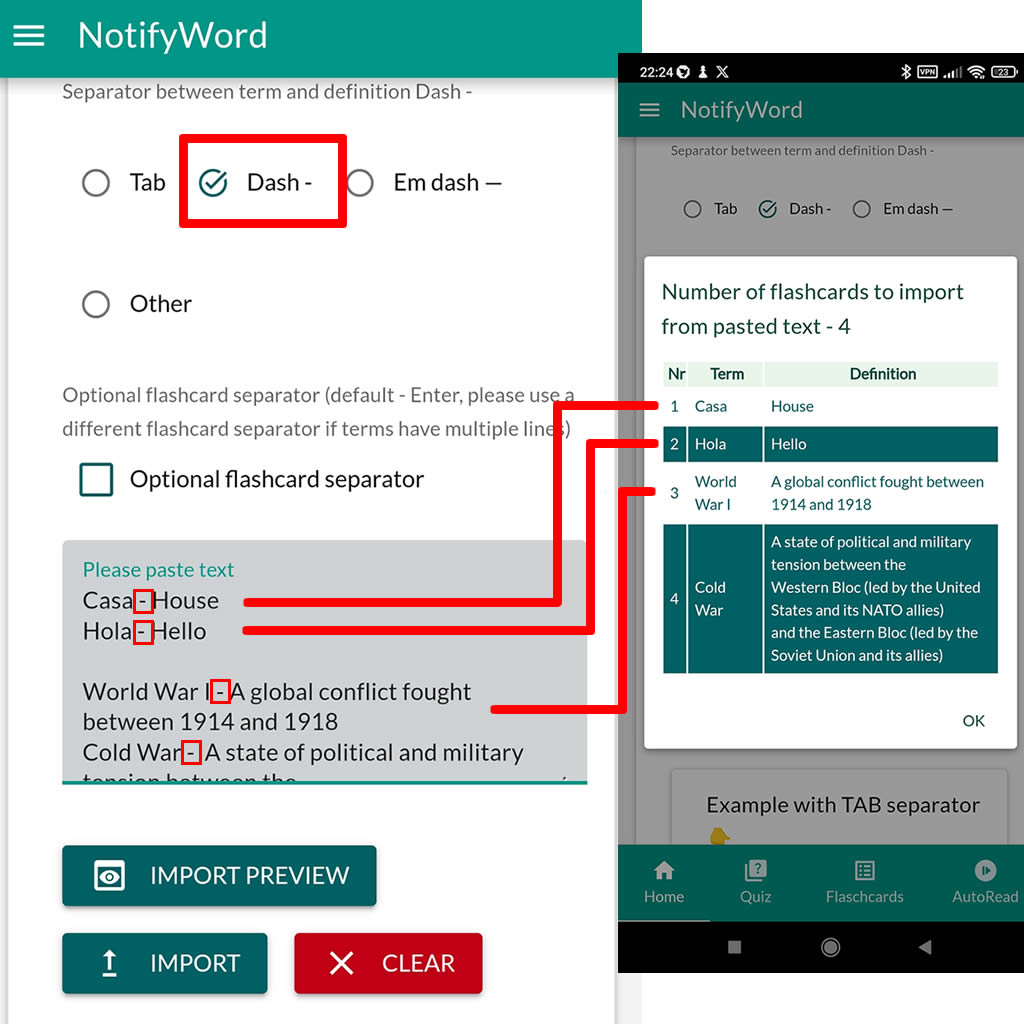
    • Easy import and flashcard creation on the website – Import entire lists of words and phrases from various sources, such as websites, other apps, or text files. Simply paste the text in the “phrase – translation” format with a list of phrases, and the app will automatically convert it into flashcards. More information in the post – creating flashcards on mobile app.
    • Effective learning in any conditions – The app can teach and review without touching the phone, with the screen locked, and without an internet connection.
    • 😎🎵🕺💃 Musical Relaxing Reviews – Play your flashcards with voice while enjoying your favorite music, no clicking required❗

    Maximizing Productivity:

    • Background learning – With voice-text notifications, you can study during daily activities such as work, listening to music, or using other apps on your phone.
    • Make the most of every moment – Automatic flashcard playback allows you to learn while walking, during travel, or combining learning with physical activity🚴🎧💪.

    Benefits of creating your own flashcards:

    • Personalization of content – Creating your own flashcards allows you to tailor content to your individual needs and language goals. You can focus on the vocabulary and phrases that are most important to you, increasing the effectiveness of your learning.
    • Increased motivation – Creating flashcards by hand makes learning more engaging and personal. Seeing the results of your work gives you greater motivation to continue learning.
    • More accurate progress tracking – You can adjust the difficulty level of the flashcards and track progress in learning specific topics. This allows for more effective monitoring of your achievements and identifying areas that need additional attention.
    • Creativity in learning – Creating your own flashcards allows you to introduce various learning techniques, examples of word usage in context, or creating associations that help with better memorization.

    Utilize all the features of this app to effectively combine learning with daily tasks and entertainment, maximizing your productivity and achieving German language goals in the most convenient way!

    Link – German flashcards hands-free learning mobile app

  • Create your own flashcards – a learning app that works without touching your phone.

    Create your own flashcards – a learning app that works without touching your phone.

    Create flashcards on the website – create a new public or private set by pasting a list of words, phrases, or terms. The app automatically converts the text into flashcards; you just need to use a separator between the words/phrases/terms and their translations/definitions, such as a hyphen ‘-’, ‘TAB’, or another symbol.

    Quick and easy flashcard import on the website.

    You can also import flashcards from other websites, files, and apps like Quizlet or Google Translate, where you can copy and export flashcards to an Excel file or formatted text. In the mobile app, you can import an Excel file, and on the website, you can paste the content of Excel as text and choose “TAB” as the separator.

    Flashcards can also be created using artificial intelligence. You can import the generated flashcards on the website or in the app on your phone. Example on the website – Generating Flashcards with Artificial Intelligence.

    Import to the app: On your phone, you can use the built-in search function that works with the website, or paste a link to the flashcards.

    Never lose your flashcards! Flashcards saved on the website cannot be lost and are easily and quickly accessible.

    Flexible learning methods: The app can read and display flashcards in various ways and generate random quizzes from multiple sets. You can choose several flashcard sets and mix them randomly to make learning even more effective.

    Personalized favorites: With the feature of adding flashcards to favorites, you can focus on the flashcards you want to master first, making the learning process much easier.

    Automated learning: The app allows you to learn while doing other activities, like walking. You don’t have to look at or click on the screen – the app will automatically play and display flashcards at your chosen pace. Customizable automatic learning options make the process even more enjoyable and tailored to your lifestyle.

    Effective Repetition: The ability to review and listen to only the flashcards that are not yet mastered allows you to focus on the more challenging terms. On the other hand, reviewing all the flashcards ensures a complete revision of the material.

    😎🎵🕺💃 Musical Relaxing Reviews – Play your flashcards with voice while enjoying your favorite music, no clicking required❗

    Playing Flashcards in Two Languages: Listen to your flashcards in different languages and voices of your choice during daily activities, without the need to look at the screen or click on the flashcards.

    Maximizing Productivity Learning in the Background – With various flashcard display options, you can study during daily activities such as work or leisure, maximizing every moment for learning.

  • Hands-Free Language Learning: App for Voice-Text Flashcards.

    Hands-Free Language Learning: App for Voice-Text Flashcards.

    Vocabulary learning, phrases, pronunciation – flashcard mobile app, NotifyWord with automatic playback and display of flashcards.

    If you’re learning foreign languages, you know how important it is to study vocabulary systematically. But what if you could learn new words while doing other daily activities? Our mobile app flashcard app NotifyWord, allows you to play flashcards in two languages even with the screen locked!

    What does the app offer?

    • Accessibility on the locked screen: Our app works even when the screen is locked and while using other apps, making learning even more convenient.
    • Playback of flashcards in two languages: Listen to your flashcards in various languages and voices of your choice during daily activities without needing to look at the screen or click on the flashcards.
    • Automatic playback: The app plays flashcards in multiple ways—randomly or in order, for learning only or all, from one or several sets.
    • 😎🎵🕺💃Musical Relaxing Reviews – Play your flashcards with voice while enjoying your favorite music, no clicking required❗
    • Create and import flashcards online: Create your own flashcard sets on our website and import them directly into the app on your phone. You can also easily import ready-made sets found online, or import flashcards from other apps like Quizlet or Google Translate.
    • Various options for automatic learning and browsing flashcards.
    • Random quizzes: Spice up your learning with random quizzes generated by the app based on your flashcards. Quizzes help reinforce new knowledge and test how well you remember the words.
    • Maximizing Productivity
      • Learning in the background – With voice-text notifications, you can learn while doing daily activities, such as working, listening to music, or using other apps on your phone.
      • Make the most of every moment – Automatic flashcard playback allows you to learn while walking, traveling, or combining learning with physical activities 🚴🎧💪.
    • Integration with Google Translate – With a single click, you can check other meanings and usage examples of words/phrases . You can also import your saved favorite phrases/expressions from Google Translate.
    • Effective Repetition: The ability to review and listen to only the flashcards that are not yet mastered allows you to focus on the more challenging terms. On the other hand, reviewing all the flashcards ensures a complete revision of the material.
    • Personalized favorites: With the feature of adding flashcards to favorites, you can focus on the flashcards you want to master first, making the learning process much easier.
    • Interactive Quizzes – Learn through fun with quizzes that allow for random testing of your knowledge. Random quizzes help reinforce the material.

    Start learning new languages in an easy and enjoyable way. Download our app and discover how effective vocabulary learning can be.

    What are flashcards?

    Flashcards are small cards or digital cards used for learning and memorizing information. One side of the flashcard usually contains a question, word, or concept, while the other side provides the answer, definition, or translation. They are often used for learning foreign languages, terms from various fields, historical dates, and other information that needs to be memorized. Flashcards are popular because they allow for effective and repetitive learning through self-testing.

    More information flashcards mobile app learning without touching the phone

    Advantages of creating your own flashcards:

    Personalization of material – Creating your own flashcards allows you to tailor the content to your individual needs and language goals. You can focus on vocabulary and phrases that are most important to you, increasing the effectiveness of learning.

    Increased motivation – Making your own flashcards makes learning more engaging and personal. Seeing the results of your work gives you greater motivation to continue learning.

    More accurate progress tracking – You can adjust the difficulty level of the flashcards and track your progress on specific topics. This allows for more efficient monitoring of your achievements and helps identify areas that need extra attention.

    Creativity in learning – Creating your own flashcards allows you to introduce various learning techniques, examples of word usage in context, or create associations that aid in better retention.

    Try it today!